Exposure controls
Adjust aperture, shutter speed, ISO, exposure compensation, and white balance when the camera and mode allow.
 ViewportCam
Canon remote control software for Mac
Connect a compatible Canon EOS camera by USB. See live view and operate the settings your camera and shooting mode expose—without interrupting the shot to reach for the body.
Test your own camera with every feature free for 14 days.
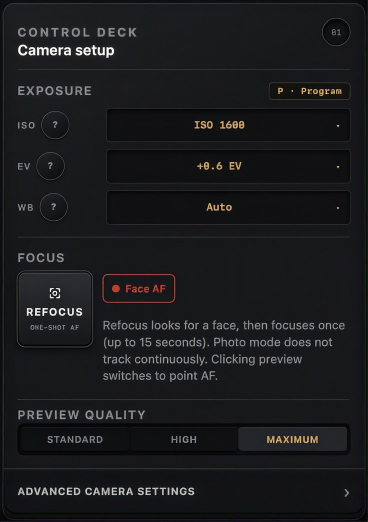
Adjust aperture, shutter speed, ISO, exposure compensation, and white balance when the camera and mode allow.
Compose in live view, use guides and one-shot autofocus, and move the supported photo focus area from the preview.
Take photos, start supported movie recording, browse the camera card, and download selected originals.
ViewportCam combines live preview and remote shooting tools with a virtual camera. Use it to prepare and run a recorded take, shoot stills, monitor a camera from your desk, or put the camera’s live-view feed into a call or stream.
Controls adapt to the connected camera and its current mode. Unsupported controls are not presented as universal capabilities.
The tested list includes the EOS R5, R6, R6 Mark II, R7, R8, R10, RP, 90D, Rebel T8i, and 5D Mark III. Other detected Canon cameras may work in experimental, best-effort mode.